$50.00O preço original era: $50.00.$25.50O preço atual é: $25.50.
-49%
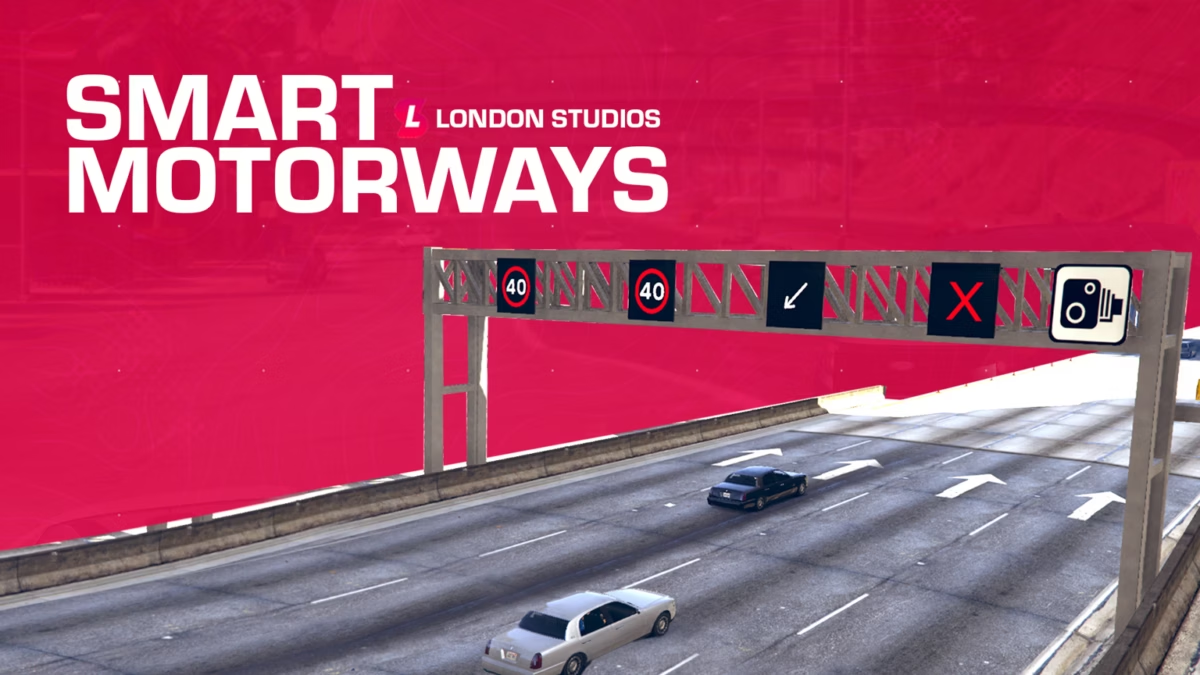
London Studios Smart Motorways
Atualizações ao vivo – Você pode fazer atualizações ao vivo de placas no mapa com nosso menu no jogo.
Vários ícones – Temos vários ícones, incluindo velocidades (20, 30, 40, 50, 50 e velocidade nacional (Reino Unido)), além de seta para a esquerda, seta para a direita e faixa fechada.
Texturas editáveis – Você pode retexturizar as velocidades se desejar.
Menu personalizado – Criamos um menu no jogo que é realista para que você possa atualizar as pistas facilmente.
Totalmente sincronizado – totalmente sincronizado com todos os players.
Permissões – Adicionamos suporte para permissões QBCore, ESX e vRP imediatamente.
Painel de controle – Nosso painel de controle no jogo permite que seus jogadores definam facilmente o ícone ou a velocidade usada acima das pistas em tempo real.
Mudanças Remotas – Os pórticos de rodovias podem ser atualizados em todo o mapa usando um comando, com um mapa permitindo que você selecione o local desejado para edição.
Sistema de CFTV – Visualize e mova facilmente câmeras de CFTV em pórticos por todo o mapa a partir do painel de controle.
Modo EUA / Reino Unido / UE – O Smart Motorways oferece suporte a três modos de transporte, incluindo EUA, Reino Unido e UE. Isso significa que oferecemos suporte a uma ampla gama de velocidades diferentes, desde o início, para o seu servidor.
Integração de Sinais Inteligentes – O Smart Motorways é integrado ao Smart Signs, o que significa que se você tiver uma cópia de ambos, poderá adicionar mensagens/ícones em um novo quadro acima de cada pórtico.
Integração de Radares Inteligentes – O Smart Motorways é integrado com Câmeras de Velocidade Inteligentes, o que significa que se você tiver uma cópia de ambas, as câmeras em todos os pórticos ficarão ativas e se ajustarão dinamicamente ao limite de velocidade definido acima de cada faixa individual, ajudando na fiscalização de velocidade.
Suporte de ícone – Além do suporte às velocidades, temos ícones incluindo seta para a esquerda e faixa fechada.
Registro do Discord – Nosso recurso pode ser integrado ao Discord com registro por webhooks. Isso permite registrar quaisquer alterações nos pórticos da rodovia e manter um registro para o futuro.
Sinais pré-configurados – Pré-configuramos mais de 60 locais no mapa, o que significa que o Smart Motorways está pronto para uso imediato.
Economia de memória – Quaisquer alterações feitas nas Smart Motorways no mapa serão salvas na memória, o que significa que permanecerão lá após reinicializações. Você pode limpar facilmente todos os sinais com o nosso comando /resetsmartmotorways.
Texturas Emissivas – Esses ícones são brilhantes tanto de dia quanto de noite, o que certamente chamará a atenção dos motoristas em qualquer hora do dia.
Suporte para várias faixas – Temos apoio para estradas de duas, três e quatro faixas.
Adicione locais facilmente – Com nosso comando de desenvolvedor, você pode adicionar facilmente novos locais no jogo que serão salvos automaticamente para a próxima reinicialização.
Configuração
config = {

    -- We've included speed options for the UK, EU, and US based servers
    -- Simply type "UK", "EU", or "US" to change the speed options
    iconPack = "UK",

    -- If you add custom icons, you can add them here
    -- Speed-related icons will be used for speed cameras, and must contain the speed limit in the name as numbers only.
    -- E.g. an icon of speed_60 will be used for a speed limit of 60. An icon of 3_speed_40 would result in a speed limit of 340.
    -- Do NOT edit this section unless you know what you are doing and have modelled custom icons.
    iconPacks = {
        ["UK"] = {
            "arrow_left",
            "arrow_right",
            "red_x",
            "speed_20",
            "speed_30",
            "speed_40",
            "speed_50",
            "speed_60",
            "national_speed",
        },
        ["EU"] = {
            "arrow_left",
            "arrow_right",
            "red_x",
            "speed_20",
            "speed_30",
            "speed_40",
            "speed_50",
            "speed_60",
            "speed_70",
            "speed_80",
            "speed_90",
            "speed_100",
            "speed_110",
            "speed_120",
            "speed_130",
            "speed_140",
            "speed_150",
        },
        ["US"] = {
            "arrow_left",
            "arrow_right",
            "red_x",
            "bv_motorway_speed_15",
            "bv_motorway_speed_20",
            "bv_motorway_speed_25",
            "bv_motorway_speed_30",
            "bv_motorway_speed_35",
            "bv_motorway_speed_40",
            "bv_motorway_speed_45",
            "bv_motorway_speed_50",
            "bv_motorway_speed_55",
            "bv_motorway_speed_60",
            "bv_motorway_speed_65",
            "bv_motorway_speed_70",
            "bv_motorway_speed_75",
            "bv_motorway_speed_80",
            "bv_motorway_speed_85",
        },
    },


    cctvKeys = {
        up = {0, 172},
        down = {0, 173},
        left = {0, 174},
        right = {0, 175},
        leaveCam = {0, 200},
    },

    -- The distance in which the sign and its speed limits will load/unload at
    loadDistance = 200.0,

    -- This will enable debug printing on both the client and the server. This should be set to false most of the time.
    developerMode = false,

    integrations = {

        smartSpeedCameras = {
            enabled = false, -- Only enable if you have the Smart Speed Cameras resource installed and up to date
            resourceName = "SmartSpeedCameras", -- This is the name of the resource which Smart Speed Cameras is installed under
            cooldown = 60, -- This is the cooldown in seconds between speed camera detections. This is to prevent spam fines.
        },

        smartSigns = {
            enabled = false, -- Only enable if you have the Smart Signs resource installed and up to date
            resourceName = "SmartSigns", -- This is the name of the resource which Smart Signs is installed under
        }

    },

    saveSpeedsOnChange = true, -- If this is set to true, the speeds will be saved to locations.json when changed. If false, the speeds will reset on restart.
    saveTextOnChange = true, -- If this is set to true, the text will be saved to locations.json when changed. If false, the text will reset on restart.
    saveIconOnChange = true, -- If this is set to true, the icon will be


    closeMenuButton = {0, 177},

    -- This allows you to enable Discord logging for the signs
    -- You must add your webhook in sv_utils.lua
    logging = {
        enabled = false,
        displayName = "Smart Motorways",
        colour = 31487,
        title = "**New Sign Log**",
        icon = "https://i.imgur.com/dcOQmpA.jpg",
        footerIcon = "https://i.imgur.com/n3n7JNW.png",
        dateFormat = "%d-%m-%Y %H:%M:%S", -- Day-Month-Year Hour-Minute-Second
    },

    resetSignsCommand = {
        enabled = true,
        commandName = "resetsmartmotorway",
        Permissions = {
                EnablePermissions = false, -- If set to false, all below job checks will be disabled, even if they are enabled in the config.lua
                AcePermissions = {
                    Permission = "update.motorway.sign",
                    Enabled = false,
                },

                ESX = {
                    Enabled = false,
                    CheckJob = {
                        Enabled = false, -- Enable this to use ESX job check
                        Jobs = {"police"} -- A user can have any of the following jobs, allowing you to add multiple
                    }
                },
                -- We've added vRP integration. All you need to do is enable it below. Then, configure if you wish to check for groups or permissions, or even both
                vRP = {
                    Enabled = false,
                    CheckGroup = {
                        Enabled = false, -- Enable this to use vRP group check
                        Groups = {"police"}, -- A user can have any of the following groups, meaning you can add different jobs
                    },
                    CheckPermission = {
                        Enabled = false, -- Enable this to use vRP permission check
                        Permissions = {"police"} -- A user can have any of the following permissions, allowing you to add multiple
                    },
                },
                -- We've added QBCore integration. All you need to do is enable it below. Then, configure if you wish to check for jobs or permissions, or even both
                QBCore = {
                    Enabled = false,
                    CheckJob = {
                        Enabled = false, -- Enable this to use QBCore job check
                        Jobs = {"police"}, -- A user can have any of the following jobs, meaning you can add different jobs
                    },
                    CheckPermission = {
                        Enabled = false, -- Enable this to use QBCore permission check
                        Permissions = {"police"}, -- A user can have any of the following permissions, allowing you to add multiple
                    },
                },
                -- We've added QBX integration. All you need to do is enable it below. Then, configure if you wish to check for jobs or permissions, or even both
                QBX = {
                    Enabled = false,
                    CheckJob = {
                        Enabled = false, -- Enable this to use QBX job check
                        Jobs = {"police"}, -- A user can have any of the following jobs, meaning you can add different jobs
                    }
                },
        },
    },

    selectSignCommand = {
        commandName = "selectsign",
        Permissions = {
                EnablePermissions = false, -- If set to false, all below job checks will be disabled, even if they are enabled in the config.lua
                AcePermissions = {
                    Permission = "update.motorway.sign",
                    Enabled = false,
                },

                ESX = {
                    Enabled = false,
                    CheckJob = {
                        Enabled = false, -- Enable this to use ESX job check
                        Jobs = {"police"} -- A user can have any of the following jobs, allowing you to add multiple
                    }
                },
                -- We've added vRP integration. All you need to do is enable it below. Then, configure if you wish to check for groups or permissions, or even both
                vRP = {
                    Enabled = false,
                    CheckGroup = {
                        Enabled = false, -- Enable this to use vRP group check
                        Groups = {"police"}, -- A user can have any of the following groups, meaning you can add different jobs
                    },
                    CheckPermission = {
                        Enabled = false, -- Enable this to use vRP permission check
                        Permissions = {"police"} -- A user can have any of the following permissions, allowing you to add multiple
                    },
                },
                -- We've added QBCore integration. All you need to do is enable it below. Then, configure if you wish to check for jobs or permissions, or even both
                QBCore = {
                    Enabled = false,
                    CheckJob = {
                        Enabled = false, -- Enable this to use QBCore job check
                        Jobs = {"police"}, -- A user can have any of the following jobs, meaning you can add different jobs
                    },
                    CheckPermission = {
                        Enabled = false, -- Enable this to use QBCore permission check
                        Permissions = {"police"}, -- A user can have any of the following permissions, allowing you to add multiple
                    },
                },
                -- We've added QBX integration. All you need to do is enable it below. Then, configure if you wish to check for jobs or permissions, or even both
                QBX = {
                    Enabled = false,
                    CheckJob = {
                        Enabled = false, -- Enable this to use QBX job check
                        Jobs = {"police"}, -- A user can have any of the following jobs, meaning you can add different jobs
                    }
                },
        },
    },

    directionColours = {
        ["north"] = 17,
        ["south"] = 18,
        ["east"] = 17,
        ["west"] = 18,
    },

    -- Here you can translate the resource into another language
    translations = {
        selectSignHelp = "Select a smart motorways sign",
        editingSign = "Now editing sign ID: ",
        hasBeenSetTo = " has been set to: ",
        speedLimitOfLane = "Speed limit of lane ",
        symbolOfLane = "Symbol of lane ",
        speedUnit = "mph",
        resetAll = "All lanes have been reset.",
        resetSignsHelp = "Reset all Smart Motorways",
    },

    -- We do not recommend editing below this section:
    -- The offsets which the signs are placed at in comparison to the sign
    spawnOffsets = {
        -- Offsets for two lane setups
        [2] = {
            [1] = {x = -3.9, y = -2.1, z = 3.65},
            [2] = {x = 1.61, y = -2.1, z = 3.65}
        },
        -- Offsets for three lane setups
        [3] = {
            [1] = {x = -6.04, y = -2.2, z = 3.65},
            [2] = {x = -0.925, y = -2.2, z = 3.65},
            [3] = {x = 3.82, y = -2.2, z = 3.65}
        },
        -- Offsets for four lane setups
        [4] = {
            [1] = {x = -9.7801, y = -2.2, z = 3.65},
            [2] = {x = -3.21, y = -2.2, z = 3.65},
            [3] = {x = 2.52, y = -2.1, z = 3.65},
            [4] = {x = 8.0501, y = -2.1, z = 3.65}
        }
    },

    -- Here you can define the various locations of the signs around the map.
    -- Here you can configure the sound effect which is played when a sign is successfully updated
    soundEffect = {
        enabled = true,
        name = "CONFIRM_BEEP",
        dict = "HUD_MINI_GAME_SOUNDSET",
    },

    gantryModels = {
        [2] = `2_lane`,
        [3] = `3_lane`,
        [4] = `4_lane`,
    },
}
Guia de configuração
O pacote entregue inclui um atalho de documentação London Studios; estas notas locais preservam o limite essencial de implantação.
Requisitos e preparação
Escolha permissões ACE, ESX, QBCore ou QBX para controles de autoestrada.
Uma revisão do mapa/localização antes de habilitar os pórticos pré-configurados.
Instalação
Extrair SmartMotorways e abra o atalho da documentação do pacote.
Configure permissões, comandos e locais de pórticos habilitados em config.lua.
Inicie o recurso e adicione quaisquer locais personalizados com seu fluxo de trabalho de desenvolvimento em staging.
Pontos de verificação de configuração
Verifique as alterações de sinalização remota, persistência após reinicialização e comportamento de reset.
Confirme que jogadores não autorizados não podem editar os sinais da rodovia.
Segurança: Faça backup do recurso afetado e das tabelas do banco de dados, use credenciais de propriedade do seu servidor e conclua um teste de staging antes de substituir um recurso ativo. A configuração completa permanece no pacote de download.
Informação adicional
Framework
ESX, QBCore, QBOX, Autônomo
Avaliações
Não há avaliações ainda.
Apenas clientes logados que compraram este produto podem deixar uma avaliação.











Avaliações
Não há avaliações ainda.